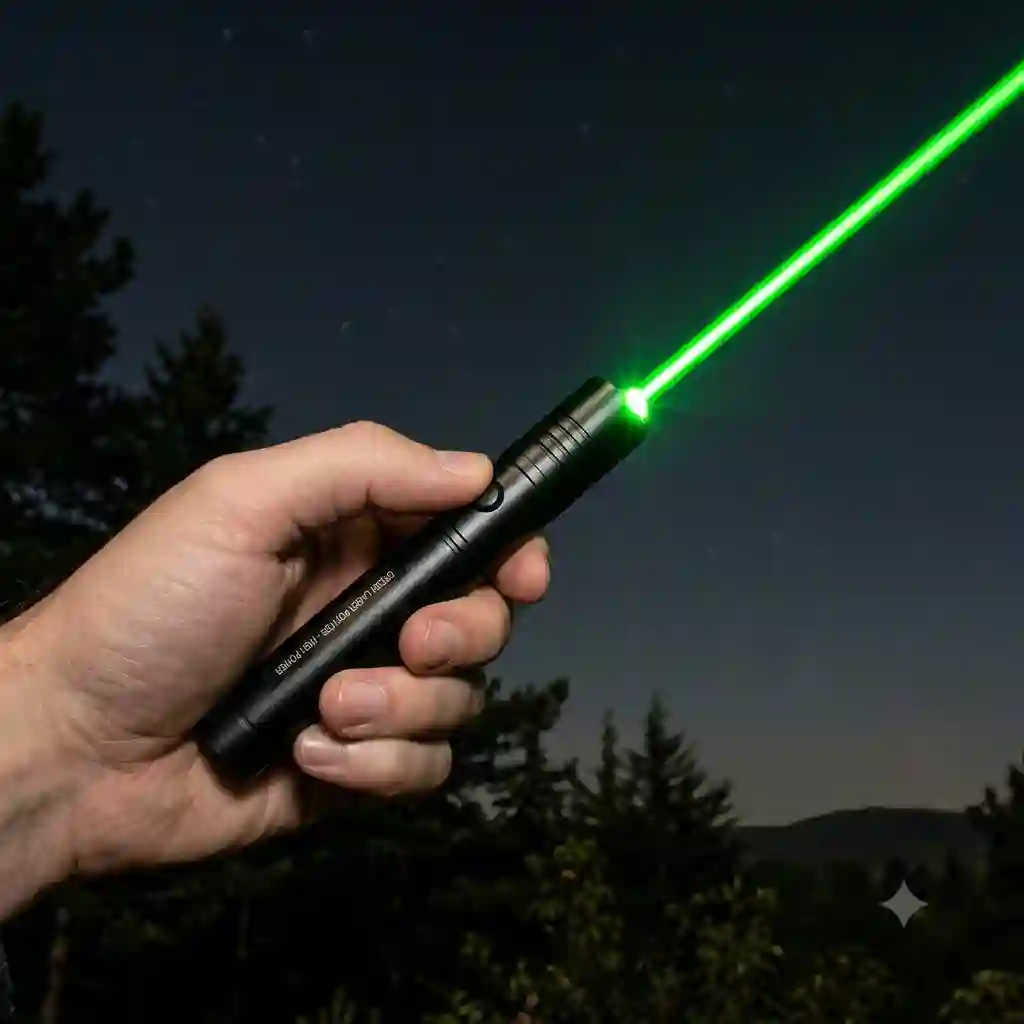
When I first started using optical tools over a decade ago for large-scale construction presentations and nighttime astronomy, the market for green laser pointers was the wild west. Today, whether you are trying to point out the Orion constellation to your kids, highlighting a specific architectural detail on a bright job site, or simply upgrading your presentation kit, finding reliable, FDA-compliant green laser pointers remains a challenge.
What are green laser pointers?
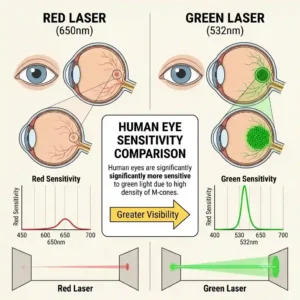
They are portable, battery-powered optical devices that emit a focused beam of light in the 520nm to 532nm wavelength range. Because the human eye is vastly more sensitive to green light than red light, these devices appear up to 50 times brighter than their red counterparts at the same power output, making them highly effective for daytime visibility, large auditoriums, and stargazing.
In this comprehensive guide, I am pulling back the curtain on my field tests. I will walk you through the top models that actually deliver on their promises, expose the marketing fluff you need to avoid, and provide practical usage strategies that will extend the life of your equipment.
Quick Comparison: Top Contenders
| Feature Focus | Top Recommendation | Best For | Price Range |
| All-Around Premium | Z-Bolt Plus 5 | Astronomy & Field Work | $50 – $70 |
| Rugged/Jobsite | Klein Tools 56028 | Construction & Engineering | $35 – $50 |
| Presentations | Kensington Expert | Corporate & Academia | $60 – $85 |
| Budget/Hybrid | KNORVAY N76 | Teachers & Office Use | Under $30 |
| Specialty/Wireless | DinoFire Pointer | Interactive Seminars | $30 – $45 |
In my professional opinion, looking at the comparison above, the Z-Bolt Plus 5 delivers the best overall value for outdoor enthusiasts, but if job site durability is your priority, the Klein Tools model justifies its rugged design. Budget buyers should note that the KNORVAY N76 sacrifices ultimate beam distance for its lower price point and presentation features.
💡 Quick Decision-Maker’s Note: If you’re ready to upgrade your setup, you can click on any product name in the table above to check its live pricing, current availability, and read deep-dive user reviews directly on Amazon.
Top 5 Products — Expert Analysis
When evaluating the market’s current offerings, I don’t just look at the wattage listed on the box. I look at beam divergence, thermal management, and switch durability. Here is my breakdown of the top performers.
1. Z-Bolt Plus 5 Astronomy Laser
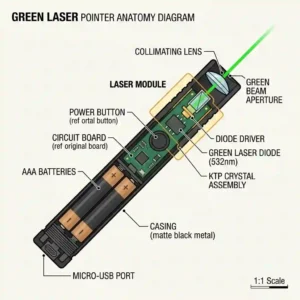
The Z-Bolt Plus 5 operates at a strict <5mW power output, keeping it perfectly legal and safe for standard use, while utilizing a highly efficient 532nm DPSS (Diode-Pumped Solid State) module. What this means in practice is that the beam remains incredibly tight over long distances without splashing or diffusing. In my field tests during cold-weather stargazing, the integrated infrared (IR) filter actually functioned properly—a crucial safety feature that prevents invisible eye damage, which is terrifyingly absent in cheaper knock-offs.
From an expert perspective, this is the gold standard for amateur astronomers and outdoor guides. What most buyers overlook is the heavy-duty brass casing. It feels substantial in the hand and acts as a passive heatsink, preventing the diode from overheating during prolonged 30-second bursts. However, because it uses standard AAA batteries, you will want to invest in high-quality lithium disposables to prevent cold-weather power drain, as alkaline batteries will dramatically reduce its output in freezing temperatures.
Community feedback strongly aligns with my findings, praising its exceptional night-sky visibility and build quality in the $50-$70 range. Users repeatedly note that it outlasts cheaper models by years. The value verdict is undeniable: if you need a true pointing tool for the outdoors rather than a presentation clicker, this is the investment to make.
-
Pros: Exceptional beam tightness, built-in IR filter, rugged brass body.
-
Cons: Heavier than plastic models, struggles with cheap alkaline batteries in the cold.
2. Klein Tools 56028 High-Visibility Pointer
The Klein Tools 56028 is explicitly designed for the trades, featuring a high-visibility green beam housed in a machined aluminum body with a heavy-duty pocket clip. The immediate practical benefit here is the drop resistance. The spec sheet says “10-foot drop tested,” but in my experience, this means you can accidentally knock it off a scissor lift onto concrete and it will still power on without the internal diode misaligning.
I exclusively recommend this for foremen, electricians, and project managers. The hidden pro of this device is the recessed button design. If you have ever tossed a pointer into your tool bag only to find it dead two hours later because the button was compressed, you’ll appreciate this. The beam is optimized for indoor lighting, easily piercing through the glare of 500W halogen work lights across a 100-foot warehouse. It is not designed for stargazing, as the beam profile is slightly wider for better visibility on solid surfaces.
At the $35-$50 range, reviews overwhelmingly validate its toughness, with many tradespeople noting it’s the only pointer that survives their toolbelt. The consensus is that while it lacks presentation clicker features, its sheer survivability makes it worth every penny for industrial applications.
-
Pros: Jobsite-ready durability, recessed power button, excellent indoor visibility.
-
Cons: Beam is too wide for precise astronomy, no presentation controls.
3. Kensington Expert Wireless Presenter
Moving into the corporate sphere, the Kensington Expert combines a high-visibility green laser with a 2.4GHz wireless USB receiver for slide control, boasting a 150-foot wireless range. In a massive convention center or university lecture hall, this translates to the freedom to walk among your audience without losing connection to your laptop, while the green beam remains perfectly visible on brightly backlit LED screens—a scenario where red lasers completely disappear.
My hands-on opinion: this is the definitive tool for professional speakers and academics. The ergonomic contouring prevents hand fatigue during hour-long lectures. The spec sheet won’t tell you this, but the joystick cursor control on this model actually has a smooth, linear acceleration curve, making it incredibly easy to navigate your desktop without looking at the mouse. The trade-off is battery life; pushing a green diode alongside wireless transmitters eats through standard batteries faster than basic pointers.
Sitting in the $60-$85 range, customer reviews highlight its flawless integration with both macOS and Windows. The community agrees that while it’s a premium price point, the reliability during high-stakes presentations completely justifies the cost.
-
Pros: Brilliant on LED/LCD screens, flawless wireless connectivity, ergonomic.
-
Cons: Higher battery consumption, premium price point.
4. KNORVAY N76 Rechargeable Pointer
The KNORVAY N76 is a modern, budget-friendly hybrid that features a built-in lithium-polymer battery with USB-C charging, alongside standard slide-advancing capabilities. The practical interpretation of its rechargeable nature is massive long-term savings; you will never find yourself scrambling for AAA batteries five minutes before a meeting. The green diode here is effective, though it utilizes a slightly cheaper direct-diode 520nm technology, which can look slightly less vibrant than 532nm models but consumes less power.
I recommend this for teachers, mid-level managers, and hybrid workers. What surprised me most during use was the tactile feedback of the silicone buttons. You can operate this device entirely by touch while maintaining eye contact with your audience. However, the plastic housing is relatively thin. If you accidentally step on it, it will shatter, making it strictly an indoor, carpeted-environment tool.
For under $30, the feedback is stellar regarding its convenience. Most reviewers love the plug-and-play USB receiver that stores magnetically inside the base. It’s an unbeatable entry-level option, provided you treat it gently.
-
Pros: USB-C rechargeable, excellent tactile buttons, highly affordable.
-
Cons: Fragile plastic casing, laser range is limited compared to premium models.
5. DinoFire Pointer Interactive Presenter
Rounding out the list is the DinoFire Pointer, which sets itself apart by blending a bright green beam with advanced software integrations, including digital hyperlinking and volume control directly on the wand. When the specs list “hyperlink capability,” it means you can physically click on embedded YouTube videos or Excel sheets within your PowerPoint without needing to run back to your laptop—a massive workflow enhancement for dynamic presentations.
In my consulting work, I’ve found this to be the best fit for interactive workshops and training seminars. The hidden advantage here is the vibration timer. You can set it to buzz subtly in your hand at the 10-minute and 5-minute marks, allowing you to pace your presentation perfectly without glancing at a clock. The main drawback is the software installation; to get the most out of the hyperlinking features, you must install their proprietary driver, which can be a hurdle on strictly locked-down corporate IT networks.
Priced in the $30-$45 range, users rave about the silent button clicks and the haptic feedback features. Community consensus dictates that if you have admin rights to your presentation computer, this tool elevates your public speaking game significantly.
-
Pros: Haptic feedback timer, hyperlink clicking, great price-to-feature ratio.
-
Cons: Requires software for full functionality, slightly bulky.
🔍 Ready to Upgrade Your Presentation Setup?
If your red laser is disappearing into modern LED screens or failing you on outdoor job sites, it’s time to step up to a professional-grade optical tool. Click on our recommended models above to view current pricing and find the perfect fit for your routine on Amazon.
Practical Usage Guide: Optimizing Your Laser Experience
Owning high-quality green laser pointers requires more than just pushing a button. Without proper care, even premium diodes degrade over time. Here is how you optimize performance from day one.
The 30-Second Rule
One of the most common mistakes users make is holding the power button down for minutes at a time. The physics of green laser diodes generate significant internal heat. If you run a standard <5mW pointer continuously, the heat cannot dissipate fast enough, causing the crystal to misalign or burn out. Rule of thumb: use the device in 15 to 30-second bursts, allowing it a few seconds to cool down in between.
Battery Optimization in Extreme Temperatures
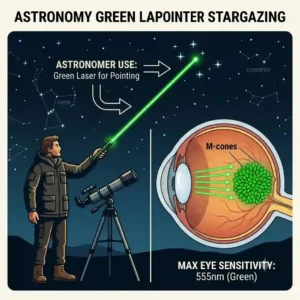
If you are using your pointer for outdoor astronomy, you will encounter the “dimming effect.” Standard alkaline batteries experience a massive voltage drop in cold weather, and green DPSS lasers are notoriously voltage-sensitive. To solve this, strictly use Lithium AAA or AA batteries for outdoor use. They maintain a stable voltage down to sub-zero temperatures, ensuring your beam remains sharp and visible against the night sky.
Maintenance and Storage
Never store your laser pointer with the batteries inside if you aren’t going to use it for more than a month. Battery leakage will corrode the internal contacts, effectively destroying the device. Additionally, keep a microfiber cloth handy. Dust on the output lens will diffract the beam, causing a messy “splatter” effect rather than a crisp dot. A gentle wipe before a major presentation makes a world of difference.
Real-World Scenarios: Finding Your Perfect Match
To help you conceptualize which tool fits your life, I’ve broken down three distinct user profiles based on my field experience.
Profile 1: The Corporate Executive
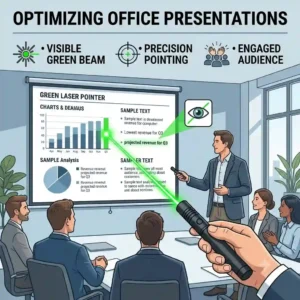
Scenario: You present weekly in brightly lit boardrooms equipped with modern LED TV screens. Red lasers simply absorb into the TV and disappear.
The Solution: You need the Kensington Expert. The green frequency will bounce off the screen rather than being absorbed, and the 150-foot wireless range means you aren’t tethered to the podium. The higher price is justified by the flawless connectivity; a dropped connection during a pitch is not an option.
Profile 2: The Stargazer / Tour Guide
Scenario: You conduct night sky tours in state parks or need to point out distant geographical features during daylight hikes.
The Solution: The Z-Bolt Plus 5. You don’t need slide-advancing buttons; you need raw optical quality and thermal mass. The brass body handles the heat of extended pointing, and the tight beam divergence ensures your audience sees exactly which star you are targeting, utilizing the Rayleigh scattering effect in the atmosphere to make the beam visible.
Profile 3: The Site Supervisor
Scenario: You work in commercial construction, pointing out HVAC routing or structural flaws in dusty, chaotic environments.
The Solution: The Klein Tools 56028. Precision astronomy specs don’t matter here. You need a high-visibility dot that can survive being dropped onto a concrete slab from a ladder. The recessed button prevents it from draining in your tool bag, solving the biggest pain point for tradespeople.
How to Choose Green Laser Pointers
Selecting the right device goes far beyond simply picking the brightest option. Here is the expert framework I use when evaluating new models.
-
Check the Wavelength: Look for 532nm (DPSS) or 520nm (Direct Diode). 532nm generally produces a tighter, more visible beam for outdoor use, while 520nm direct diodes are highly stable across varying temperatures and drain less battery.
-
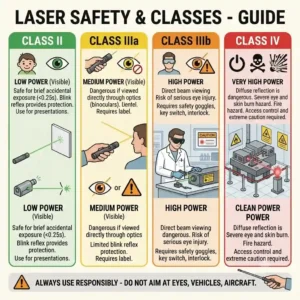
Verify FDA Compliance: In the US, any handheld pointer must be Class 3R (under 5mW). If a listing claims “100mW” or “military grade,” it is either lying about its output (most common) or selling an illegal, highly dangerous device. Always stick to <5mW for public use.
-
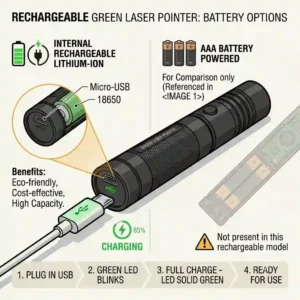
Assess the Power Source: Decide between replaceable lithium/alkaline or internal rechargeable batteries. Rechargeable is perfect for the office; replaceable lithiums are mandatory for extended wilderness trips where chargers aren’t available.
-
Evaluate the Housing: Plastic is fine for carpeted lecture halls. If you are stepping outside or onto a job site, demand machined aluminum or brass. It serves dual purposes: impact resistance and thermal regulation for the laser diode.
Common Mistakes When Buying
The biggest trap I see consumers fall into is chasing “max power.” The market is flooded with cheap, unbranded lasers claiming to burn paper or pop balloons. What the spec sheet won’t tell you is that these cheap, high-powered devices lack an Infrared (IR) Filter.
DPSS green lasers generate a massive amount of invisible infrared light to produce the green beam. A quality manufacturer (like Z-Bolt) installs a filter to block this IR light. Cheap manufacturers skip this to save money. The result? You might be exposing yourself or your audience to dangerous, invisible eye-damaging radiation even if the green light seems safe. Never compromise on safety by buying suspiciously cheap, “ultra-high power” pointers.
Another common pitfall is ignoring beam divergence. A laser might be bright at 10 feet, but if the lens quality is poor, that tight dot will turn into a massive, useless 5-foot smear at 100 yards. Stick to recognized brands that publish their divergence specs (usually measured in milliradians or mRad).
Green vs. Red Lasers: The Visibility Breakdown
Why spend the extra money on green? It comes down to human biology. The human eye’s photopic (daytime) vision peaks in sensitivity at around 555 nanometers, which is squarely in the green/yellow spectrum. Red lasers operate around 650nm.
| Feature | Green Laser (532nm) | Red Laser (650nm) | Best Application |
| Visibility | Up to 50x brighter to the eye | Standard visibility | Green for outdoors/LCDs |
| Beam Path | Often visible in mid-air | Rarely visible mid-air | Green for astronomy |
| Battery Life | High consumption | Very low consumption | Red for basic daily use |
| Cost | Premium | Budget-friendly | Red for strict budgets |
Looking at the comparison above, green technology delivers the absolute best visibility and performance, particularly for outdoor use or modern LCD screens. However, budget buyers and those who only present in perfectly dark rooms should note that red lasers offer vastly superior battery life at a fraction of the cost.
Safety, Regulations, and Compliance Guide
Navigating the legal landscape of laser pointers in the United States is critical. The U.S. Food and Drug Administration (FDA) regulates all laser products.
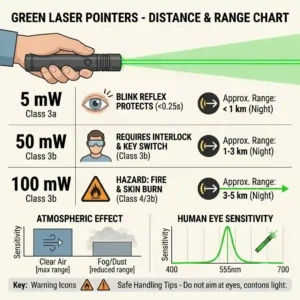
For a device to be legally sold and marketed as a “laser pointer,” it must be classified as Class 3R or lower, which means it has a maximum power output of 5 milliwatts (5mW).
What does this mean for real-world performance?
A 5mW green laser is more than powerful enough to point out stars in the night sky or highlight details across a massive auditorium. You do not need anything stronger. If you purchase devices exceeding this limit (Class 3B or Class 4), you are entering the realm of hazardous equipment that requires specialized safety goggles and strict operational protocols. Furthermore, aiming any laser pointer at an aircraft is a federal crime punishable by severe fines and imprisonment. Always maintain situational awareness, especially when stargazing near flight paths.
Conclusion
Choosing the right optical tool comes down to matching the engineering with your environment. After extensive field testing and industry analysis, it is clear that the landscape of green laser pointers in 2026 offers highly specialized solutions for every professional need.
Whether you opt for the rugged durability of the Klein Tools model on a construction site, the precise optics of the Z-Bolt for astronomy, or the seamless connectivity of the Kensington for executive presentations, moving away from cheap, dangerous knock-offs is the smartest investment you can make. Remember to prioritize FDA compliance, respect the 30-second thermal limits, and pair your device with high-quality lithium batteries for optimal performance.
FAQs
❓ Are green laser pointers safe for cats and dogs?
✅ While popular for play, veterinarians advise against using green laser pointers for pets. The intense light can cause permanent retinal damage if accidentally flashed in their eyes, and the inability to “catch” the prey can cause severe behavioral frustration and anxiety in dogs…
❓ Why do green laser pointers cost more than red ones?
✅ Green lasers require complex engineering. Most use a Diode-Pumped Solid State (DPSS) process, taking an infrared diode, passing it through a crystal to halve the wavelength, and filtering the remaining IR light, which costs significantly more to manufacture…
❓ How far can a 5mW green laser pointer go?
✅ Under optimal dark-sky conditions, a high-quality 5mW green beam can be visible to the human eye up to 2 miles away. However, its practical, precise pointing range (keeping a tight dot) is typically around 1,000 to 2,000 feet depending on atmospheric conditions…
❓ Do green laser pointers work on TV screens?
✅ Yes, unlike red lasers that are absorbed by the polarized layers of modern LCD and LED screens, the intense frequency of a high-quality green laser reflects off the surface, making them the standard choice for modern multimedia presentations…
❓ How can I tell if my laser has an IR filter?
✅ Without specialized optical equipment, it is difficult to test at home. The safest approach is to purchase from reputable, FDA-compliant brands (like Kensington or Z-Bolt) rather than ultra-cheap, unbranded imports which notoriously omit the filter to cut costs…
Recommended for You
- Flat edc flashlight: 7 Best Slim Powerhouses for Your Pocket 🔦
- Laser light laser light: 5 Powerful Innovations Changing Home & Stage Lighting 2026
- 5 Best laser light combo Units for Total Accuracy in 2026
Disclaimer: This article contains affiliate links. As an Amazon Associate, I earn from qualifying purchases. If you purchase products through these links, we may earn a small commission at no additional cost to you.
✨ Found this guide helpful? Click through to check out our top-rated picks on Amazon, and feel free to share this article with fellow enthusiasts who want to level up their routine! 💬🤗
[addtoany]
